Welcome to Kev’s Gym 🎉
We’re excited to have you moving through the onboarding process.
This page provides clear, step-by-step instructions for every required onboarding item. Even though these steps are also listed in your portal, this guide is designed to:
- Eliminate confusion
- Prevent common errors
- Help you complete onboarding quickly and smoothly
Please review each section carefully and complete all required steps.
✅ Overview of Required Onboarding Steps
- New Instructor Intake Form
- Professional Headshot Submission
- Optional Instructional Photos
- Upload Certifications
- Direct Deposit (Voided Check)
- Certificate of Insurance (COI)
- Review & Sign Training Materials
- Independent Contractor Agreement
- W-9 Form
You must complete all required steps before you are eligible to teach with Kev’s Gym.
1️⃣ New Instructor Intake Form
What This Is:
The New Instructor Intake Form collects your:
- Personal information
- Contact details
- Address
- Class specialties
- Required disclosures
- Acknowledgments and disclaimers
How to Complete It:
- Fill out every required field
- Select all class formats you are certified to teach
- Review and acknowledge all disclaimers
- Submit once complete
The form is intuitive and straightforward — simply answer each question carefully.
✅ Once submitted, this step is complete.
2️⃣ Submit a Professional Headshot
Why We Need This:
Your headshot:
- May be included in client confirmation emails (sent ~24 hours before class)
- Is used in our internal scheduling system
- May appear on our website or social media
- Helps clients feel comfortable knowing who to expect
Important: This Must Be a Headshot
Action shots are NOT acceptable.
We need a professional headshot (face and shoulders only).
Headshot Requirements:
- High-quality image (not a selfie)
- Clear, centered view of your face
- Good lighting (natural light preferred)
- Clean, neutral background
- Professional fitness attire
- No sunglasses
- No hats
- No distracting elements
This image represents both you and Kev’s Gym in senior communities, corporate offices, and professional wellness settings.
Please ensure it reflects a polished and professional appearance.
3️⃣ Instructional Photos (Optional)
Please upload 3–5 high-resolution horizontal photos of you instructing:
- Seated Yoga
- Standing Yoga
- Exercise
- Tai Chi
- Zumba / Dance
Photo Guidelines:
- Horizontal orientation
- Clear resolution
- Professional quality
- Good lighting
We may use these images for:
- Website content
- Social media
- Marketing materials
👉 If you prefer that your photos NOT be used publicly, submission is optional.
4️⃣ Upload Certifications
We are required to keep official certifications on file in case a client requests verification.
⚠️ Please upload your actual certificate of completion — not a membership dashboard, renewal page, profile screenshot, payment receipt, or ID number.
✅ Minimum Requirement
You must hold at least one completed certification in one of the following:
- Yoga
- Personal Training
- Tai Chi
- Zumba
- Group Fitness
- Or a related fitness discipline
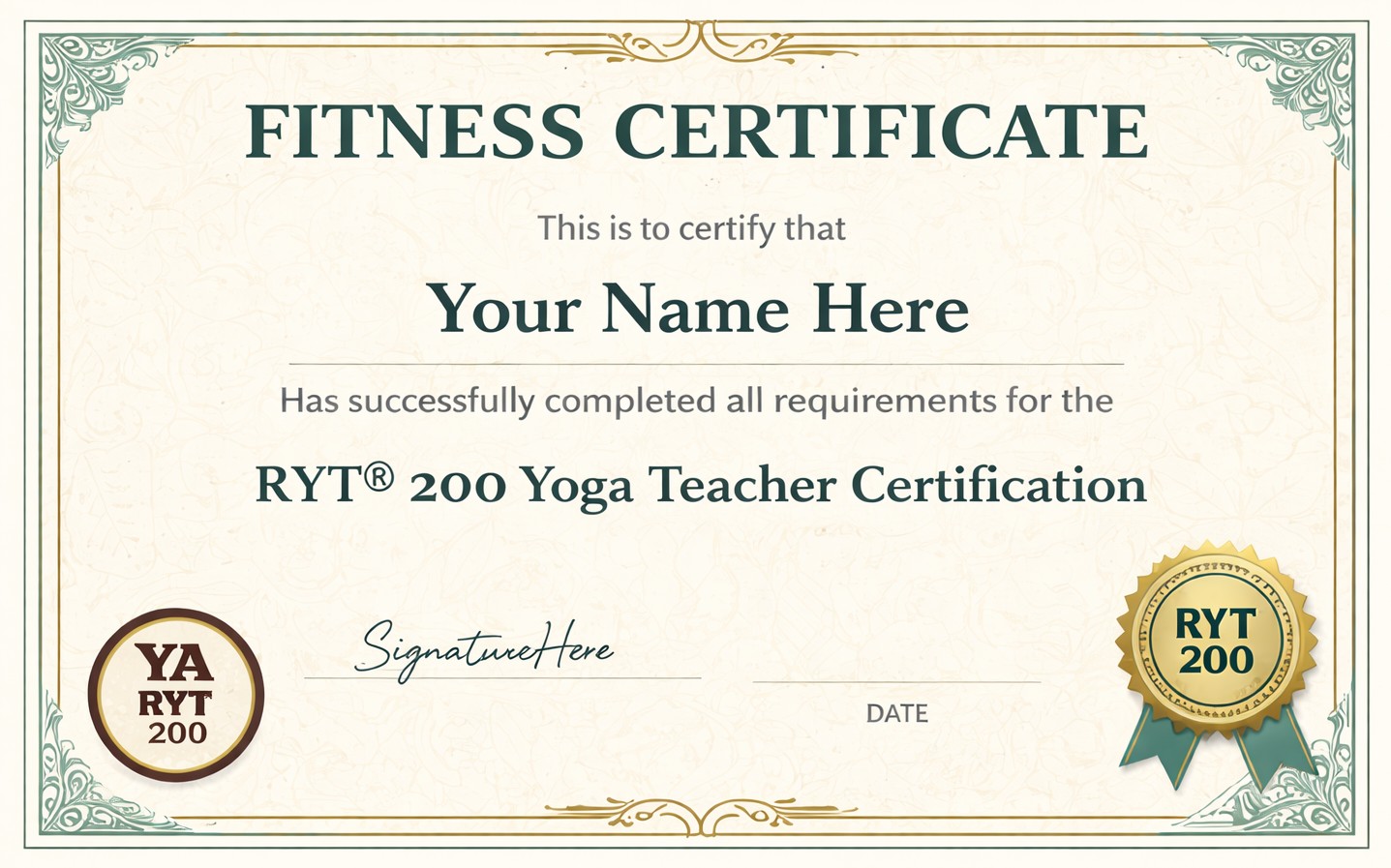
📄 What to Upload
Please upload:
- A clear copy of your official certificate of completion
- Documentation that shows your name
- The certifying organization
- The credential earned
- The completion date and/or expiration date
- Current and valid credentials
- Certifications for every format you plan to teach
If you plan to teach multiple formats, you must upload certifications for each.
If you are unsure whether your document qualifies, please review the example below of an acceptable certificate provided before submitting.
Incomplete or incorrect submissions will delay your onboarding approval.
5️⃣ Direct Deposit Setup (Voided Check Required)
Payment is issued via direct deposit only.
To prevent errors, we require:
✅ A photo of a voided paper check
OR
✅ A voided electronic check from your bank
Not Accepted:
- Word documents listing routing/account numbers
- Typed bank information
- Screenshots without verification
We require a voided check to ensure routing/account numbers are accurate and typo-free.
Incomplete or incorrect submissions may delay payment.
6️⃣ Certificate of Insurance (COI)
You must upload your Certificate of General Liability Insurance with:
Kev’s Gym, LLC listed as an Additional Insured
Why This Is Required:
Many retirement communities require instructors to carry general liability insurance. This protects:
- You financially in the event of injury during class
- Kev’s Gym
- The client community
This coverage may also extend to other fitness work you perform outside of Kev’s Gym.
Kev’s Gym Information for Your Insurance Provider:
Kev’s Gym, LLC
11710 Olde English Dr. Unit K
Reston, VA 20190
Required Coverage Limits:
- Each Occurrence: $1,000,000
- Damage to Rented Premises: $100,000
- Medical Expenses: $2,500
- Personal & Advertising Injury: $1,000,000
- General Aggregate: $1,000,000
Certificate Holder Must Read:
Kev’s Gym, LLC
11710 Olde English Dr. Unit K
Reston, VA 20190
Do Not Have Insurance Yet?
If you do not currently carry general liability insurance, you will need to purchase a policy before completing onboarding.
To make this easier, we’ve compiled a list of insurance providers commonly used by fitness professionals:
👉 View Recommended Insurance Providers:
https://www.kevsgym.com/insurance-providers/
These providers specialize in fitness professionals and typically offer affordable annual policies.
📌 For detailed instructions and a sample COI, visit:
👉 https://www.kevsgym.com/certificate-of-insurance-coi-requirements/
Failure to meet the above requirements will delay approval.
7️⃣ Review & Sign Training Materials
You must review all training materials and sign off on each presentation to confirm your understanding.
Training files include:
🚀 Your First Class & Admin
Tips for leading an amazing first class and handling administrative responsibilities.
📘 Senior Fitness Class Guidelines
Best practices for delivering safe, engaging, and effective senior fitness sessions.
👕 Professional Appearance & Hygiene Policy
Standards for attire, grooming, and presentation.
🗓️ Requesting Time Off
How to properly manage availability.
🚗 Travel Compensation
How to request additional pay for eligible classes beyond a 20-minute commute.
🏡 Information About Our Clients
Learn about the communities and residents you will serve.
📅 Jobber Training Manual
How to use Jobber for scheduling and class management.
💵 How to Get Paid
How to invoice and receive timely payment.
💼 Additional Paid Opportunities
Ways to grow your role and increase earnings.
You may also access instructor training materials here:
👉 https://www.kevsgym.com/instructor-training/
You must complete all training acknowledgments before teaching.
8️⃣ Independent Contractor Agreement
Please carefully review the Independent Contractor Agreement.
This document outlines:
- Your role and responsibilities
- Compensation structure
- Compliance requirements
- Professional standards
- Legal terms and conditions
By signing, you acknowledge that you:
- Have read the agreement
- Understand its contents
- Agree to all terms and conditions
Please do not sign without reviewing it thoroughly.
9️⃣ W-9 Form
The W-9 is required for tax reporting and payment processing.
Important Instructions:
- Both the SSN and EIN fields must be completed.
- If you are operating as a business or LLC with an EIN:
→ Enter your EIN in BOTH the SSN and EIN fields. - If you are a sole proprietor or individual (no EIN):
→ Enter your SSN in BOTH the SSN and EIN fields.
Critical:
- The name on the W-9 must EXACTLY match the name associated with your SSN or EIN per IRS records.
- Incorrect, mismatched, or incomplete information will delay payment processing.
If You Need to Make a Correction
If you made an error on your original submission, you may upload a corrected form in the “W-9 Resubmission” section of the online onboarding portal.
If you need to complete a new W-9, you may download the official IRS Form here:
👉 https://www.irs.gov/pub/irs-pdf/fw9.pdf
Please fill out the form completely, sign it, and upload it to the portal under “W-9 Resubmission.”
🚨 Common Mistakes That Delay Onboarding
Please avoid these frequent issues:
- Forgetting to list Kev’s Gym, LLC as Additional Insured
- Submitting a selfie instead of a professional headshot
- Uploading typed banking information instead of a voided check
- Uploading expired certifications
Carefully reviewing this page before submission will help prevent delays.
🎯 Final Reminder
You may not begin teaching until:
- All required documents are approved
- Insurance is verified
- Training sign-offs are complete
- Agreements are signed
Our goal is to make this process smooth, professional, and efficient — for you and for our clients.
We are excited to welcome you to the Kev’s Gym team.
If you have questions not addressed here, please contact:
📩 humanresources@kevsgym.com
Comments are closed.